
SUNDAY, MAY 26, 2013
Font Size
Six Sigma Tools & Templates Design of Experiments (DOE) Optimize Attribute Responses Using Design of Experiments

Optimize Attribute Responses Using Design of Experiments

The objective of a design of experiments (DOE) is to optimize the value of a response variable by changing the values, referred to as levels, of the factors that affect the response. Although often a response is continuous in nature, there are some cases in which the response falls in the attribute category (e.g., pass/fail, accept/reject, etc.). This article explains how to analyze an attribute type of response, using an example from the manufacturing sector.

Example Experiment

In this example there are three factors with two levels. The factors are renamed as Factor1, Factor2 and Factor3, and the levels are coded as -1, +1.
 
The experiment was conducted with 10 replicates, or repetitions of the experiment at each combination of level settings, to provide greater accuracy for attribute data.

In this example, the total number of runs was LF x replicates = 23 x 10 = 80, where L = number of levels and F = number of factors.

A single set of experiments with 10 replicates is shown in Table 1.

Table 1: Results of 10 Replicates with 1 Combination of Levels

Factor1

Factor2

Factor3

Response

-1

+1

-1

OK

-1

+1

-1

NOK

-1

+1

-1

OK

-1

+1

-1

OK

-1

+1

-1

OK

-1

+1

-1

OK

-1

+1

-1

OK

-1

+1

-1

OK

-1

+1

-1

OK

-1

+1

-1

OK

Next, the responses for the replicates of this experiment were converted into proportions, p. In the results shown in Table 1, the proportion of OK (okay) to NOK (not okay) was 9 out of 10. Thus, p = 0.90.
 
Once the experiment was conducted for all combinations of levels, the captured OK/NOK attribute responses were converted into proportions, displayed in Table 2.
Table 2: Summary of Experiment Data for All Combinations of Levels

Factor1

Factor2

Factor3

p

-1

-1

1

0.70

1

-1

-1

0.00

-1

1

-1

0.90

1

1

1

0.60

1

1

-1

0.40

-1

1

1

1.00

1

-1

1

0.00

-1

-1

-1

0.10

Arcsine Function

The arcsine square-root transform  is the variance stabilizing transform  for the binomial distribution and is the most commonly used transformation. It assists when working with proportions and percentages. The proportion, p, can be made nearly normal if the square root of p is used with the arcsine (or inverse sine: sin-1) transform. The arcsine transform is then computed as a function of p → arcsin (sqrt(p)).

In the example, the calculated p was converted into sqrt(p) and then again converted into arcsin (sqrt(p)) by using the arcsine function. The results are shown in Table 3.

Table 3: Updated Results with Arcsine Function

Factor1

Factor2

Factor3

p

Sqrt(p)

Arcsin (sqrt(p))

-1

-1

1

0.70

0.83666

0.99116

1

-1

-1

0.00

0.00000

0.00000

-1

1

-1

0.90

0.94868

1.24905

1

1

1

0.60

0.77460

0.88608

1

1

-1

0.40

0.63246

0.68472

-1

1

1

1.00

1.00000

1.57080

1

-1

1

0.00

0.00000

0.00000

-1

-1

-1

0.10

0.31623

0.32175

Analysis of Results

The general linear model (GLM) in analysis of variance (ANOVA) was used to identify the significant factor(s) among the three factors. The arcsine value was specified as the response, and Factor1, Factor2, Factor3 were provided as the factors. The output of GLM is shown in Figure 1.
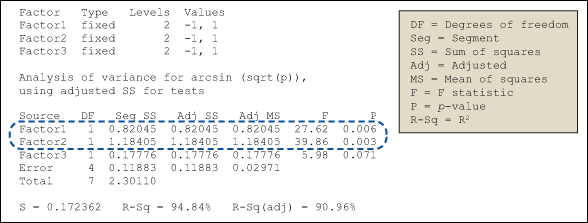
Figure 1: General Linear Model: Arcsin (Sqrt(p)) Versus Factor1, Factor2, Factor3

Figure 1: General Linear Model: Arcsin (Sqrt(p)) Versus Factor1, Factor2, Factor3

The p-value calculated within the GLM results indicates that Factor1 and Factor2 are statistically significant. That is, those factors have a significant bearing on the arcsine value.

Interaction Plot

An interaction plot displays the mean of the response variable for each level of a factor with the level of a second factor held constant. Interaction plots are useful for judging the presence of interactions – when the response at one factor level depends upon the level(s) of other factors.

Parallel lines in an interaction plot indicate no interaction; non-parallel lines indicate an interaction between the factors. The greater the departure of the lines from the parallel state, the higher the degree of interaction. To produce an interaction plot, data must be available from all combinations of levels.

An interaction plot for the sample data is shown in Figure 2.
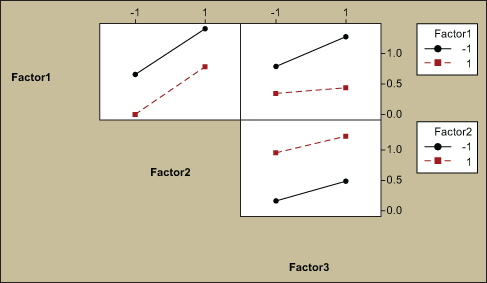
Figure 2: Interaction Plot for Arcsin (sqrt(p))

Figure 2: Interaction Plot for Arcsin (sqrt(p))

In all cases in Figure 2, the interaction lines are parallel, which shows there are no significant interactions between the factors.

Main Effects Plot

A main effects plot is used in conjunction with ANOVA and DOE to examine differences in the response variable at varying levels for one or more factors. When different levels of a factor affect the response differently, a main effect is present. A main effects  plot graphs the response mean for each factor level connected by a line.

The general patterns to look for are:

  • When the line is horizontal (parallel to the x-axis), there is no main effect present. Each level of the factor affects the response in the same way, and the response mean is the same across all factor levels.
  • When the line is not horizontal, then there is a main effect present. Different levels of the factor affect the response differently. The steeper the slope of the line, the greater the magnitude of the main effect.

The sample data is shown in a main effects plot in Figure 3 and suggests that a main effect is present in Factor1 and Factor2 as the lines are not horizontal.

In the example, a larger value of the response arcsin (sqrt(p)) represents a better outcome. With that in mind, the analysis suggests that the levels -1 for Factor1, +1 for Factor2 and +1 for Factor3 will provide the desired results (i.e., high proportion of acceptance, or low proportion of rejections).
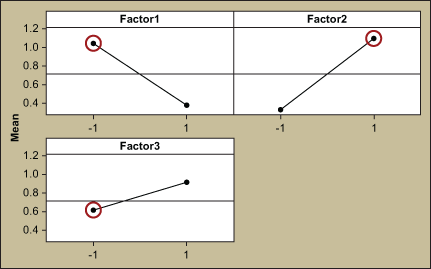
Figure 3: Main Effects Plot for Arcsin (sqrt(p))

Figure 3: Main Effects Plot for Arcsin (sqrt(p))

Response Optimization

Response optimization is a method of analysis to identify the combination of input variable settings that jointly optimize a single response or a set of responses. Within a statistical analysis program, the response optimizer function provides an optimal solution for the input variable combinations, and sometimes an optimization plot. The optimization plot may be interactive, in which case the input variable settings can be adjusted on the plot to search for more desirable solutions.

Figure 4 shows the results of the response optimizer analysis for the example data. It indicates that the maximum arcsine is 1.5708 with a desirability of 1.
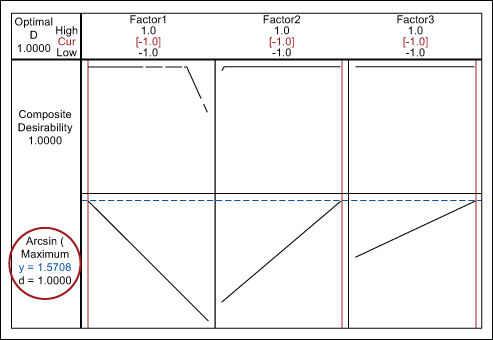
Figure 4: Response Optimization

Figure 4: Response Optimization

Solution and Verification

Based on the results of the analysis, the process parameters for factors are set at the following levels to reduce the number of rejections:

  • Factor 1: -1
  • Factor 2: +1
  • Factor 3: +1

To verify the above settings, 30 experiments were conducted and resulted in 0 rejections. With that verification, the process settings were approved and updated in all appropriate process documents.

Comments

Avatar of John Noguera
John Noguera 08-10-2012, 03:30

Thank you for the interesting article. However, this approach does not take into account the sample size of your replicates. There is a statistical difference between 7/10 and 700/1000!

The way to do that (and thus also avoid the need to transform) is to use binary logistic regression.

Reply
Avatar of Maxim Korenyugin
Maxim Korenyugin 10-10-2012, 00:56

John,
you are spot on right. I recommend using FTP transform from Minitab which does following:
(arcsin(sqrt(x/(n+1)+arcsin(sqrt((x+1)/(n+1)))/2 (I hope I made no mistakes re-typing it, x being number of events and n – sample size).
As you may see, it does take into account sample size, but it’s impact is very limited on the transformed value – especially on the bigger sample sizes.
I ran across this problem when preparing a data set for a training. I started comparing results of FTPed analysis via classical DOE vs. Binary Logistic Regression (BLR). It was 5 factors half factorial. Results were little short of shocking. While DOE was able to find only 2 terms as significant, BLR found 7 – including 2 interactions. This is obviously a result of taking sample sizes directly into significance calculations. Then I decided to take significance from BLR and added those terms to DOE and ran Response Optimizer. Then I got second big surprise – even direction of combined impacts of main terms and interactions was different between DOE and BLR. In other words BLR for Term A would say “Increase” and DOE says “Decrease” to minimize output (output was proportion of defective credit application forms). This is obviously due to linear/non-linear way of modeling impact of terms in DOE and BLR respectively. Again, by simply looking at the math, one should expect some differences, but not such big ones!
I found that practical difference diminishes when sample size goes down.
Bottom line – For anyone who is advanced enough I would recommend BLR without hesitation (with 2-way interactions as well). For some LSS students however it might be a tough call. So we are talking to Minitab trying to define a border when FTPed DOE would still be OK (like Sample size<30 or something). I can keep you posted as soon as I hear more from them.

Regards,
Maxim

Reply
Avatar of John Noguera
John Noguera 11-10-2012, 03:29

Maxim, Michael,

Thank you for your comment. There is definitely a trade off for BLR on statistical accuracy versus difficulty of interpretation. I would be very interested to hear if you come up with a Rule of Thumb on sample size where the Freeman-Tukey transformation results are practically the same as BLR.

Reply
Avatar of Maxim Korenyugin
Maxim Korenyugin 11-10-2012, 22:10

John,
This is reply from Minitab ( Thank you, Joel M. Smith for detailed answer!!!)
“Let’s start with the transformation – you can read plenty about these transformations, including an alternate for small values of x or n, at http://rfd.uoregon.edu/files/rfd/StatisticalResources/arcsin.txt. It is plain text but has plenty of information. The basics of why you would do that are (a) you end up with an easier-to-understand model and (b) you hopefully get residuals that behave well. Conversely, there are some big issues with it. One is that while the model may make more sense, your response is no longer easier to understand. So if you use Response Optimizer, for example, you are now optimizing some number that behaves in the right direction (minimizing the transformed response would also minimize the actual proportion) but gives a predicted value that doesn’t make sense (so if it predicts a transformed y of .18 that doesn’t correspond to an 18% failure rate) so you then have to transform the predicted y back to real values. Additionally, depending on the dataset you could start to predict values less than 0 or greater than 1 which is obviously undesirable.

In your dataset, both x and n are fairly large so there’s really no need for a transformation anyway…I would just divide them and use the proportion as the response. The transformation is only potentially handy when these numbers are fairly small. With proportion you get the easy model AND a response that is easy to interpret. But you could still predict outside of (0,1) and your still fitting a linear model to something that generally does not behave linearly.

BLR is really the best model (as you saw) and really the only drawback there is that the output is not as easy to understand and the model is difficult to interpret. But an easy way to find optimal setting is to store the event probabilities when you run the model, and then graph them on an Individual Value Plot and use Brushing with Set ID Variables to identify the combination with the desired response (for example, the smallest points on the graph).

Adding response optimization to BLR is on our list of “to-do’s” in the software so hopefully once we are able to add that BLR will be usable enough that you don’t even have to consider these issues!”
So essentially he says that FTP makes sense only for small numbers of both X and N. No definite borders mentioned. If I am asked at a class I will probably come up with magical <30 for n – and 20%< 5 for x (even thought I have no firm evidence). But I would really stick to Binary Logistic Regression. Some reasons for differences between FTPEd DOE and BLR – in a separate post.
Regards,
Maxim

Reply
Avatar of Maxim Korenyugin
Maxim Korenyugin 11-10-2012, 22:29

John,.
I dug a bit, stretching my matrix algebra skills beyond their limits and here here what I ended up with – trying to investigate mathematically 2 issues.
1. Why significance of terms (main effects and 2-way interactions are so different between BLR and FTPed DOE
2. Why even directions of factor influence (resulted from main effects and 2-way interactions) are different between FTPEd DOE and BLR (i had a particular situation when to minimize Y – defective rate BLR says factor A should go up, DOE says it should go down). Here are my thoughts:
1. Significance difference is due to the difference for how Stnadard Errors are calculated
Here is DOE
Estimated Effects and Coefficients for C13 (coded units)

Term Effect Coef SE Coef T P
Constant 0.09534 0.007079 13.47 0.000
instruction -0.08692 -0.04346 0.007079 -6.14 0.002
form -0.01701 -0.00851 0.007079 -1.20 0.283
font -0.00046 -0.00023 0.007079 -0.03 0.975
method -0.00630 -0.00315 0.007079 -0.44 0.675
assistance 0.01252 0.00626 0.007079 0.88 0.417
instruction*font -0.01844 -0.00922 0.007079 -1.30 0.250
instruction*assistance -0.02022 -0.01011 0.007079 -1.43 0.213
form*font 0.05530 0.02765 0.007079 3.91 0.011
form*method -0.02801 -0.01401 0.007079 -1.98 0.105
font*method -0.02793 -0.01397 0.007079 -1.97 0.105

S = 0.0283147 PRESS = 0.0410482
R-Sq = 93.05% R-Sq(pred) = 28.81% R-Sq(adj) = 79.14%

SE Coefficient is calculated based on the formulae like Se(bi) = Sqrt [MSE / (SSXi * TOLi) ]

where MSE is the mean squares for error from the overall ANOVA summary, SSXi is the sum of squares for the i-th independent variable, and TOLi is the tolerance associated with the i-th independent variable.

TOLi = 1 – Ri^2, where Ri^2 is determined by regressing Xi on all the other independent variables in the model.

Then the rest is trivial. T equals Coeff/SE and so on.

For BLR:
Binary Logistic Regression: incomplete, total_app versus instruction, form, …

Link Function: Logit

Response Information

Variable Value Count
incomplete Event 642
Non-event 6283
total_app Total 6925

Logistic Regression Table

95%
Odds CI
Predictor Coef SE Coef Z P Ratio Lower
Constant -1.93327 0.122754 -15.75 0.000
instruction
Y -0.677131 0.181209 -3.74 0.000 0.51 0.36
form
B -0.550191 0.145998 -3.77 0.000 0.58 0.43
font
medium -0.209086 0.155112 -1.35 0.178 0.81 0.60
method
computer 0.394121 0.168885 2.33 0.020 1.48 1.07
assistance
Y 0.350131 0.0975177 3.59 0.000 1.42 1.17
instruction*font
Y*medium -0.471691 0.217636 -2.17 0.030 0.62 0.41
instruction*assistance
Y*Y -0.442080 0.220134 -2.01 0.045 0.64 0.42
form*font
B*medium 1.33891 0.174881 7.66 0.000 3.81 2.71
form*method
B*computer -0.622187 0.175994 -3.54 0.000 0.54 0.38
font*method
medium*computer -0.532491 0.175341 -3.04 0.002 0.59 0.42

The standard error for the coefficients can be retrieved from the inverse Hessian matrix calculated during the model fitting phase and can be used to give confidence intervals for the odds ratio. The standard error for the i-th coefficient of the regression can be obtained as: SEi = sqrt(diag(H-1)i) where Hessian matrix is built of second derivatives of Y by all pairs of Xs with direct d2y/(dxi)2 on diagonal of the matrix.

One thing from this matrix– which is also visible from Minitab output – is that SE for DOE is equal for all terms, whereas ones for BLR are different! This difference stays even if sample sizes for all treatments are the same. This happens when Hessian matrix takes second derivatives from f (which is logit in this case). Visually, one can see this non-linearity when makes a Scatter plot of probability (logit of linear Y) vs. single X. Standard Error around probability of 0.5 is higher (slope is close to vertical).

Here is the reason for difference in significance.

Second point re difference in impact of factors.
I have found one important difference how interactions are taken into predictions for both models.
DOE takes low level as -1 and high as +1, so for interactions -1*-1=1 and +1*+1=1 so we have 2 treatments in DOE structure contributing to +1. However BLR thinks in terms (0,1), so it takes only (+1,+1) point as interaction. It lists them in the coefficient table. In other words (-1,-1) point in DOE terms sits together with (-1+1) and (+1-1) and is treated as 0.
This is a massive difference, and the one which needs to be taken into consideration while building a model in Excel using BLR coefficients (initially I made a mistake treating them as (+1-1 ) for interactions.
This explains for me practical differences in predictions.
Again – BLR is more trustworthy (but still a bit trickier in predictions).

.
Regards,
Maxim

Avatar of John Noguera
John Noguera 14-10-2012, 12:38

Maxim,

Thank you for the detailed response comparing FTP to BLR.

In order to optimize the Minitab Event Probability model, you could set up the equation in Excel and then use Solver or DiscoverSim to perform the optimization.

John

Mike86 08-10-2012, 08:42

Please check the factor signs in Table 1. I’m showing -1 for Factor 1, +1 for Factor 2, and -1 for Factor 3 in all experiments.

Reply
Manikandan.J 08-10-2012, 23:00

Thanks for your interest on the Article.
Table-1 is just a sample for 1 set of experiments with 10 Replicates. Due to space constraints it was difficult to display the entire experiments. If you look at Table-2 I have given the summary of the results with converted proportion values. Hope it clarifies.

Reply
Michael Ohler 10-10-2012, 08:26

John, you are spot on right.

We recommend using FTP transformation for binary outputs of DOE before analyzing it. FTP transform does the following (arcsin(sqrt(x/(n+1))+arcsin(sqrt((x+1)/(n+1)))/2 (I hope I made no mistakes with brackets, x being number of events and N – sample size). As you may see, it does take sample size into account, but its impact rapidly goes down when n goes up.
Recently I was preparing a data set for training and decided to compare results of analysis via DOE and Binary Logistic Regression. Results were nothing short of shocking.
Data set was 5 factors, half factorial, with sample size per treatment being 600. The output was number of incomplete credit card applications. DOE on FTPed data was able to find only 2 terms as significant. BLR found 9 – with 5 interactions!!! That was obviously due to the fact that BLR takes sample size into significance calculations.
Then I took significant terms from BLR to DOE and run Response Optimizer. And I got second big surprise. Even direction of a factor impact calculated from main effects and interactions was different. DOE would say – Increase A to decrease number for defectives. BLR would say – decrease A! This is obviously due to differences between purely linear model of terms impact in DOE and log transform of BLR.
Again, it should be no surprise that results would be different, if one looks at actual math behind these 2 tools. However I did not expect difference to be so practically significant!
My take away – use BLR if you know how to run it and read results. However, for some LSS students playing with interactions in BLR and making final transfer function of probability with backward LN transform manually might be a tough call.
So we are investigating with Minitab possible limits of using FTPed data within DOE functionality (i guess it will be something like Sample size5 or something). If you wish I can keep you guys posted on the development.

Regards,
Maxim Korenyugin and Michael Ohler

Reply
Jeff Larsen 19-10-2012, 13:19

Enjoyed reading, really studying Manikandan-Jayakumar write-up. The only question I would have is: Could you not reach the same conclusion by using an ‘Attribute Agreement Analysis?’ It seems that the purpose of DOE is to describe a design that provides a purpose, which is to provide the most efficient and economical way to reach a valid conclusion. However, the article flow does provide a simple interpretation of results found which speaks well to the design..

Thanks, well done and worth the read!

Reply
Jeff Parks 28-11-2012, 12:25

Great article!

Reply

Register Now

  • Stop this in-your-face notice
  • Reserve your username
  • Follow people you like, learn from
  • Extend your profile
  • Gain reputation for your contributions
  • No annoying captchas across site
And much more! C'mon, register now.

Leave a Comment


Practical Lean Six Sigma Problem Solving from Air Academy Associates
Lean and Six Sigma eLearning and Blended Solutions
Lean and Six Sigma Project Examples

Login Form